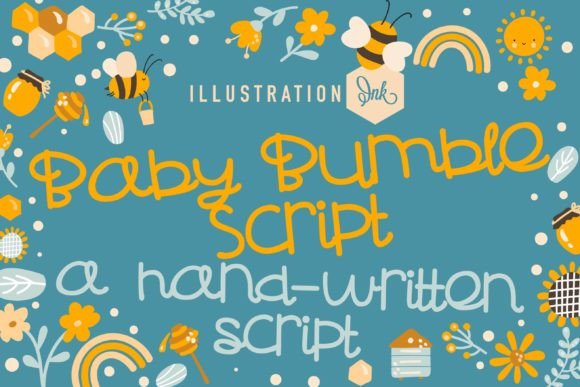
Baby Bumble Script: A Playful Font for Handmade Shops
The design screen is blank, save for a simple candle shape. I’m working on a new label for my seasonal lavender candle, and I need a name that feels both charming and handmade. My usual clean sans-serif feels too sterile. I want warmth, a touch of whimsy, something that whispers "hand-poured" and "small batch." That’s when I opened the font folder and clicked on Baby Bumble Script. Instantly, the mood shifted.
Capturing Charm on Product Labels
Baby Bumble Script is, in essence, a burst of joyful handwriting captured in a digital typeface. Its letterforms have a delightful bounce; the lowercase ‘g’ curls with a smile, the ‘y’ tails off with a gentle flick. It doesn’t feel stiff or overly polished. Instead, it carries the energy of a playful sketch, perfect for infusing products with personality. When I typed “Lavender Dreams” onto my candle label mockup, the words seemed to dance. The font’s inherent warmth transformed a simple product name into a brand story.
This is where its strength lies for makers: emotional appeal. On physical products like candle labels, sticker sheets, or boutique tags, Baby Bumble Script creates an immediate connection. It suggests care, creativity, and a personal touch. I tested it across various mockups:
- Greeting Cards & Invitations: For a birthday card headline or a wedding welcome sign mockup, the font adds a celebratory, personal feel without being overly formal.
- Product Packaging: On a minimalist tote bag design or a mug, used for a short phrase like “Morning Magic,” it acts as a perfect decorative accent.
- Printable Wall Art: In digital downloads for seasonal quotes, its whimsical nature enhances the decorative purpose, making the art feel crafted rather than just typed.
The key is to use it for display purposes. It excels at short phrases, product names, titles, and decorative wording where you want to capture attention and convey mood.
Readability and Practical Considerations
While its charm is undeniable, a practical review must address readability. Because of its decorative, handwritten nature, Baby Bumble Script is not suited for dense blocks of text. I would not use it for lengthy product descriptions on a label, safety instructions, or detailed terms on an invitation. Its beauty shines at a larger scale.
For cutting machine users (like Cricut or Silhouette), it performs well for vinyl cuts or sticker designs, provided the text size is adequate. Small, intricate details in the script might become challenging for very tiny cuts, so scaling up slightly ensures a clean result. On printed materials like cards and labels, ensure your printing process can handle the font’s fine lines crisply. It reads beautifully at the sizes typically used for headlines and focal points.
Pairing with Other Fonts
To create a balanced, professional design, pairing is essential. Baby Bumble Script, as a dominant display script font, needs a supportive counterpart for body text. I paired it with a simple, clean sans-serif font for the candle’s ingredient list and weight details. This contrast creates a clear visual hierarchy: the playful script draws the eye to the product name, while the clean sans-serif provides legible, essential information. You could also pair it with a sturdy serif font for a more classic, editorial feel on things like wedding stationery.
Technical Specs for Commercial Use
Before using any font on physical products or digital downloads you intend to sell, checking the technical details and license is crucial. For Baby Bumble Script, ensure your license covers commercial use—selling physical products (like mugs, shirts, or printed cards) and digital items (like printable PDFs or design templates) is typically covered by a standard commercial license, but always verify. For embedding in software or apps, a different license may be required.
Also, explore the font’s included features. Many premium script fonts offer:
- Alternates and Ligatures: These are alternate letterforms or joined characters that add variety and a more natural handwritten flow to your text.
- Multiple File Formats: Ensure you have the formats you need (like OTF, TTF) for your design software and cutting machine compatibility.
- Language Support: Check if it supports the characters you need for your market.
Investing time in understanding these assets lets you use the font to its full potential, creating more unique and custom-looking designs for your shop.
Where It Shines and Where to Pause
Baby Bumble Script has become a go-to in my toolkit for projects that need a heartwarming touch. It’s ideal for:
- Branding Accents: For a small shop logo or a recurring decorative element on packaging, it can establish a recognizable, friendly brand identity.
- Seasonal Designs: Its playful innocence works wonderfully for holiday tags, spring-themed wall art, or festive invitation headers.
- Product Highlights: Use it to emphasize a product’s key benefit or name on a shop listing image, making the listing visually engaging.
However, pause before using it for:
- Very small text on tags or labels where legibility is paramount.
- Long paragraphs in any medium.
- Highly technical or formal documents where clarity is the sole priority.
Its purpose is decorative and emotive. Respecting that boundary ensures your designs remain both beautiful and functional.
Finally, seeing Baby Bumble Script come to life on a real product—like the final printed lavender candle label—solidified its value. It wasn’t just a font on my screen; it was a co-creator, adding that layer of handmade charm I was searching for. It turns functional text into a design element that carries feeling, and for makers, sellers, and printable creators, that emotional translation is often exactly what connects a product to a person.